
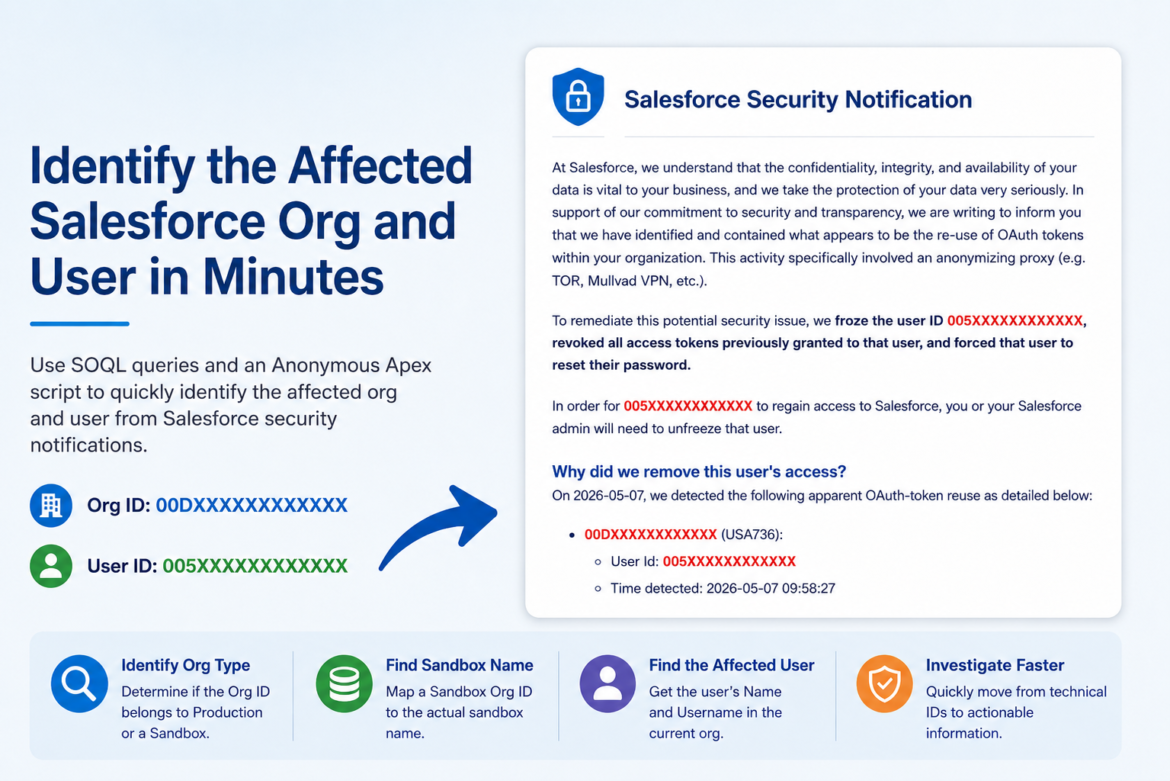
Salesforce has been increasing protections against suspicious access patterns, including access from anonymizing VPNs, proxies, and other high-risk IP addresses. In some cases, this can lead to users being frozen or blocked when Salesforce detects risky activity. Salesforce explains this in its help article about preventing connections from anonymizing VPNs, proxies, and high-risk IP addresses.
When this happens, the notification or investigation details may include technical IDs such as:
Org ID: 00DXXXXXXXXXXXX
User ID: 005XXXXXXXXXXXX
Those IDs are useful, but they are not easy to understand at a glance. As an admin, consultant, or support person, you usually need to answer a few questions quickly:
Which Salesforce org was affected?
Was it Production or a Sandbox?
If it was a Sandbox, which sandbox was it?
Which user was affected?
Does the user exist in the org I am currently checking?
This is where a small set of SOQL queries and an Anonymous Apex script can help.
Why This Matters
When Salesforce freezes or blocks a user due to suspicious activity, time matters.
You do not want to waste time guessing whether the affected Org ID belongs to Production, a developer sandbox, a UAT sandbox, or another environment.
You also do not want to assume that the User ID belongs to the same org as the Org ID, because the Org ID could belong to a sandbox, while the User ID may exist in Production. That can be misleading if your output does not clearly say where the user was found.
Also, the script can be used to find sandboxes expiring soon.
What This Script Helps You Do
At a high level, the script helps you translate Salesforce IDs into readable information.
It can help you identify:
The org type: Production or Sandbox
The sandbox name, if the Org ID belongs to a sandbox
The user’s Name and Username
Whether the user was found in the current org where the script is running
This is especially helpful when investigating security notifications related to high-risk IP addresses, VPNs, proxies, connected apps, or API activity.
Important Concept: The User Lookup Runs in the Current Org
This is the most important detail.
The User query checks the org where you are running the script.
If you run the script in Production, it checks Production users.
If you run the script in Sandbox, it checks Sandbox users.
So if you run the script in Production with a sandbox Org ID and a Production User ID, the script may correctly say:
Org: Sandbox
Sandbox Name: dev
User found in current org: Production | User Name: John Smith | Username: john@example.com
That means:
The Org ID belongs to the dev sandbox.
The User ID was found in Production because that is where the script was executed.
This avoids the confusion of thinking the user was found in the sandbox.
The Anonymous Apex Script
Use this script in Developer Console → Execute Anonymous Window, or in VS Code via sfdx execute anonymous apex.
Before running it, update these two values:
String orgId = '00DXXXXXXXXXXXX';
String userId = '005XXXXXXXXXXXX';
Both are optional. You can leave either one blank.
String orgId = '00DXXXXXXXXXXXX';  // Optional. Leave blank to check current org.
String userId = '005XXXXXXXXXXXX'; // Optional. Leave blank to skip user lookup.

String orgType;
String orgName;
String sandboxName;
String userOutput;


// =====================================================
// 1. Current org context
// =====================================================

Organization currentOrg = [
    SELECT Id, Name, IsSandbox
    FROM Organization
    LIMIT 1
];

String currentSandboxName;

if (currentOrg.IsSandbox) {
    System.Domain domainInfo = System.DomainParser.parse(URL.getOrgDomainUrl());
    currentSandboxName = domainInfo.getSandboxName();
}


// =====================================================
// 2. Org check
// =====================================================

if (String.isBlank(orgId)) {
    orgType = currentOrg.IsSandbox ? 'Sandbox' : 'Production';

    if (currentOrg.IsSandbox) {
        sandboxName = currentSandboxName;
        orgName = sandboxName;
    } else {
        orgName = currentOrg.Name;
    }
} else {
    List<Organization> orgs = [
        SELECT Id, Name, IsSandbox
        FROM Organization
        WHERE Id = :orgId
        LIMIT 1
    ];

    if (!orgs.isEmpty()) {
        orgType = orgs[0].IsSandbox ? 'Sandbox' : 'Production';

        if (orgs[0].IsSandbox) {
            sandboxName = currentSandboxName;
            orgName = sandboxName;
        } else {
            orgName = orgs[0].Name;
        }
    } else {
        // This only works when running from Production and checking a sandbox org id
        if (!currentOrg.IsSandbox) {
            String toolingQuery =
                'SELECT SandboxOrganization, SandboxName ' +
                'FROM SandboxProcess ' +
                'WHERE SandboxOrganization = \'' + String.escapeSingleQuotes(orgId) + '\' ' +
                'ORDER BY CreatedDate DESC ' +
                'LIMIT 1';

            String endpoint =
                URL.getOrgDomainUrl().toExternalForm() +
                '/services/data/v60.0/tooling/query/?q=' +
                EncodingUtil.urlEncode(toolingQuery, 'UTF-8');

            HttpRequest req = new HttpRequest();
            req.setEndpoint(endpoint);
            req.setMethod('GET');
            req.setHeader('Authorization', 'Bearer ' + UserInfo.getSessionId());

            HttpResponse res = new Http().send(req);

            if (res.getStatusCode() == 200) {
                Map<String, Object> body =
                    (Map<String, Object>) JSON.deserializeUntyped(res.getBody());

                List<Object> records = (List<Object>) body.get('records');

                if (!records.isEmpty()) {
                    Map<String, Object> record = (Map<String, Object>) records[0];

                    sandboxName = (String) record.get('SandboxName');
                    orgType = 'Sandbox';
                    orgName = sandboxName;
                }
            }
        }
    }
}


// =====================================================
// 3. User check in the current org where script is running
// =====================================================

String currentOrgLabel;

if (currentOrg.IsSandbox) {
    currentOrgLabel = 'current org: Sandbox - ' + currentSandboxName;
} else {
    currentOrgLabel = 'current org: Production';
}

if (String.isBlank(userId)) {
    userOutput = 'User: Not provided';
} else {
    List<User> users = [
        SELECT Id, Name, Username
        FROM User
        WHERE Id = :userId
        LIMIT 1
    ];

    if (!users.isEmpty()) {
        userOutput =
            'User found in ' + currentOrgLabel +
            ' | User Name: ' + users[0].Name +
            ' | Username: ' + users[0].Username;
    } else {
        userOutput = 'User not found in ' + currentOrgLabel;
    }
}


// =====================================================
// 4. Output
// =====================================================

System.debug('===== RESULT =====');

if (orgType == 'Production') {
    System.debug('Org: Production');
    System.debug('Org Name: ' + orgName);
} else if (orgType == 'Sandbox') {
    System.debug('Org: Sandbox');
    System.debug('Sandbox Name: ' + orgName);
} else {
    System.debug('Org: Not found' + (String.isBlank(orgId) ? '' : ' for Id: ' + orgId));
}

System.debug(userOutput);
Running the Script in Anonymous Apex
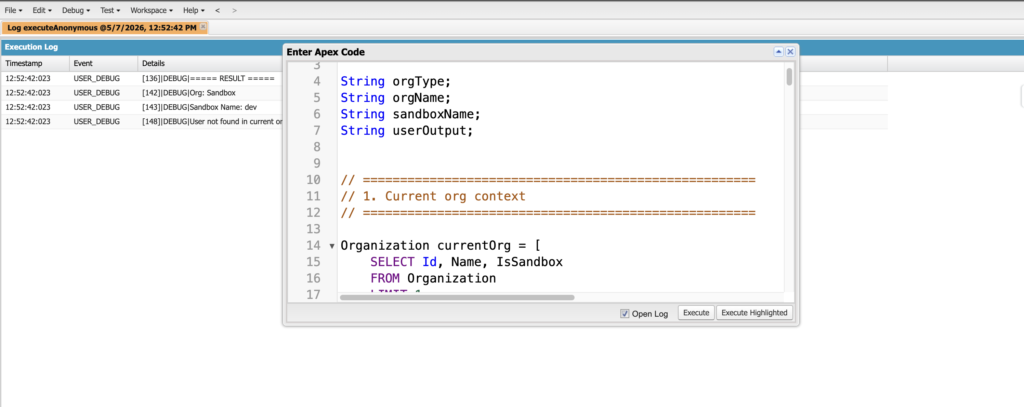
Example Output
If the Org ID belongs to a sandbox and the user is found in Production, the output may look like this:
===== RESULT =====
Org: Sandbox
Sandbox Name: dev
User found in current org: Production | User Name: John Smith | Username: john@example.com
This means:
The provided Org ID belongs to the dev sandbox.
The provided User ID was found in Production because the script was executed in Production.
If you run the script inside a sandbox and the user does not exist there, the output may look like this:
===== RESULT =====
Org: Sandbox
Sandbox Name: dev
User not found in current org: Sandbox - dev
This means:
The current org is the dev sandbox.
The User ID was not found in that sandbox.
Main SOQL Queries Used by the Script
The script uses a few simple queries behind the scenes.
You can also run these manually using Salesforce Inspector Reloaded or Developer Console Query Editor.
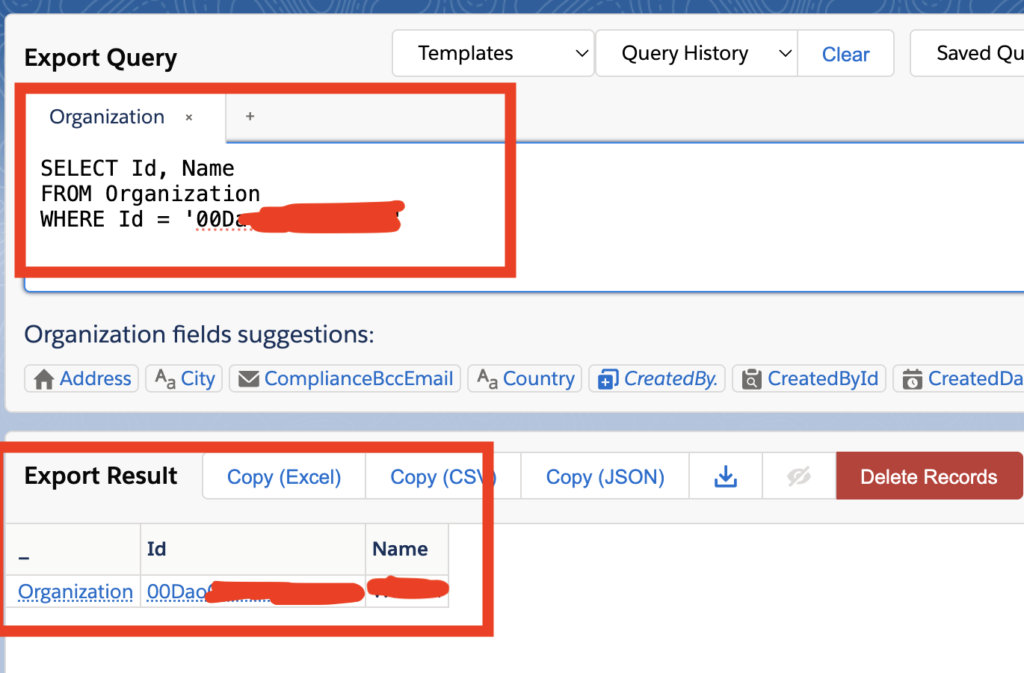
Query 1: Check a Specific Org ID
Use this when you have an Org ID and want to check if it belongs to the org you are currently logged into.
SELECT Id, Name, IsSandbox
FROM Organization
WHERE Id = '00DXXXXXXXXXXXX'
If this returns a row, the provided Org ID is the current org.
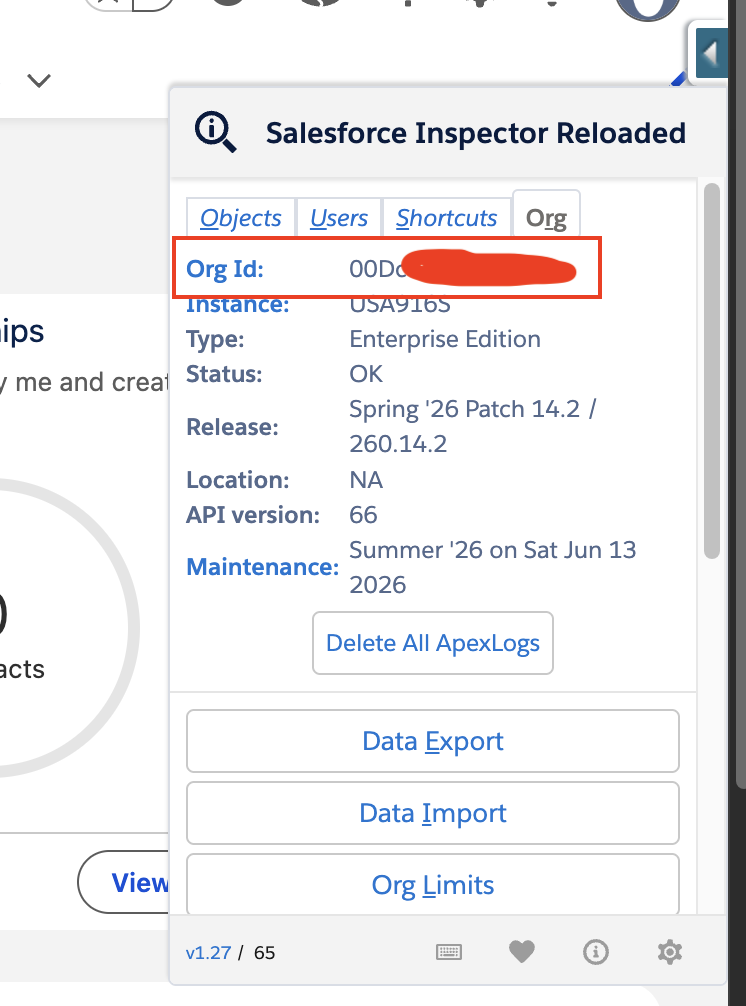
Or simply check the Salesforce Inspector’s Org tab
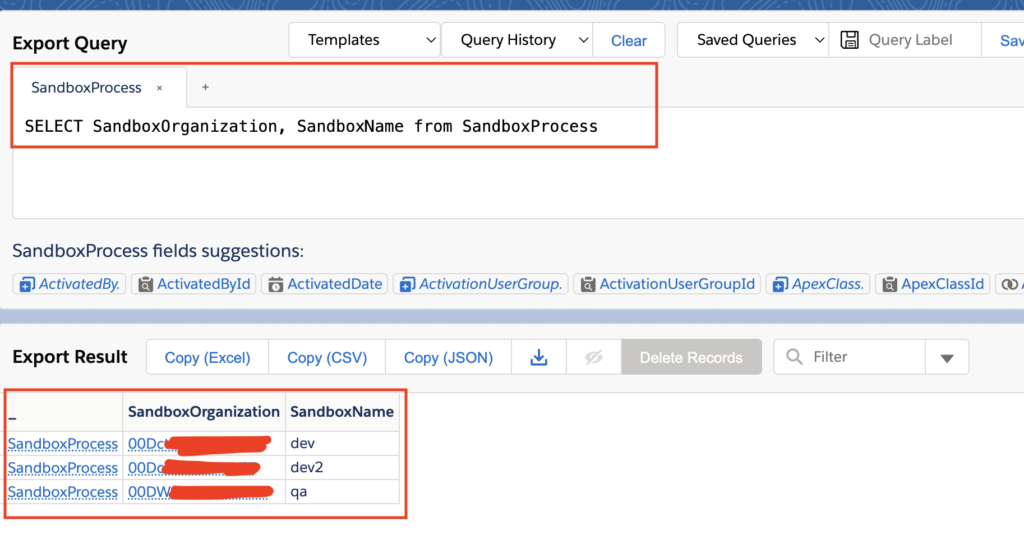
Query 2: Find the Sandbox Name from a Sandbox Org ID
Run this from Production using the Tooling API.
SELECT SandboxOrganization, SandboxName
FROM SandboxProcess
WHERE SandboxOrganization = '00DXXXXXXXXXXXX'
This maps a sandbox Org ID to the sandbox name.
Example result:
SandboxOrganization = 00DXXXXXXXXXXXX
SandboxName = dev
This is useful when a Salesforce security notification gives you a sandbox Org ID but not the readable sandbox name.
Query 3: Find a User by User ID
Run this in the org where you want to check the user.
SELECT Id, Name, Username
FROM User
WHERE Id = '005XXXXXXXXXXXX'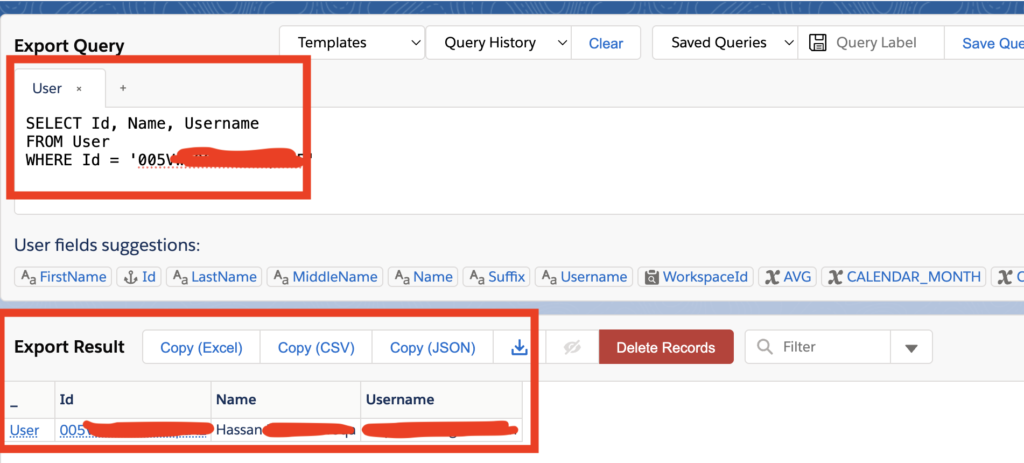
How This Helps with High-Risk IP / VPN Investigations
When Salesforce flags or freezes a user because of suspicious access from a high-risk IP, anonymizing VPN, or proxy, you may need to quickly identify the affected user and org.
The Salesforce notification may include IDs, but not always the friendly names you need for investigation.
This script helps you quickly move from:
Org ID: 00DXXXXXXXXXXXX
User ID: 005XXXXXXXXXXXX
to:
Org: Sandbox
Sandbox Name: dev
User found in current org: Production | User Name: John Smith | Username: john@example.com
That gives you a faster starting point for the rest of your investigation.
When to Run This Script
This script is helpful when:
- You receive a Salesforce security notification with an Org ID and User ID.
- A user is frozen, and you need to identify who they are.
- You need to know whether an Org ID belongs to Production or Sandbox.
- You need to map a sandbox Org ID to a sandbox name.
- You are checking whether a User ID exists in Production or Sandbox.
- You are troubleshooting VPN, proxy, high-risk IP, or connected app access issues.
Final Takeaway
Salesforce security notifications often include technical IDs that are not immediately readable.
- This script and the supporting SOQL queries help you quickly identify:
- Which org was involved
- Whether it was Production or Sandbox
- Which sandbox was involved
- Which user was found
- Which org the user was found in
That makes the investigation faster, clearer, and less error-prone, especially when dealing with high-risk IP, VPN, proxy, or suspicious access events.