
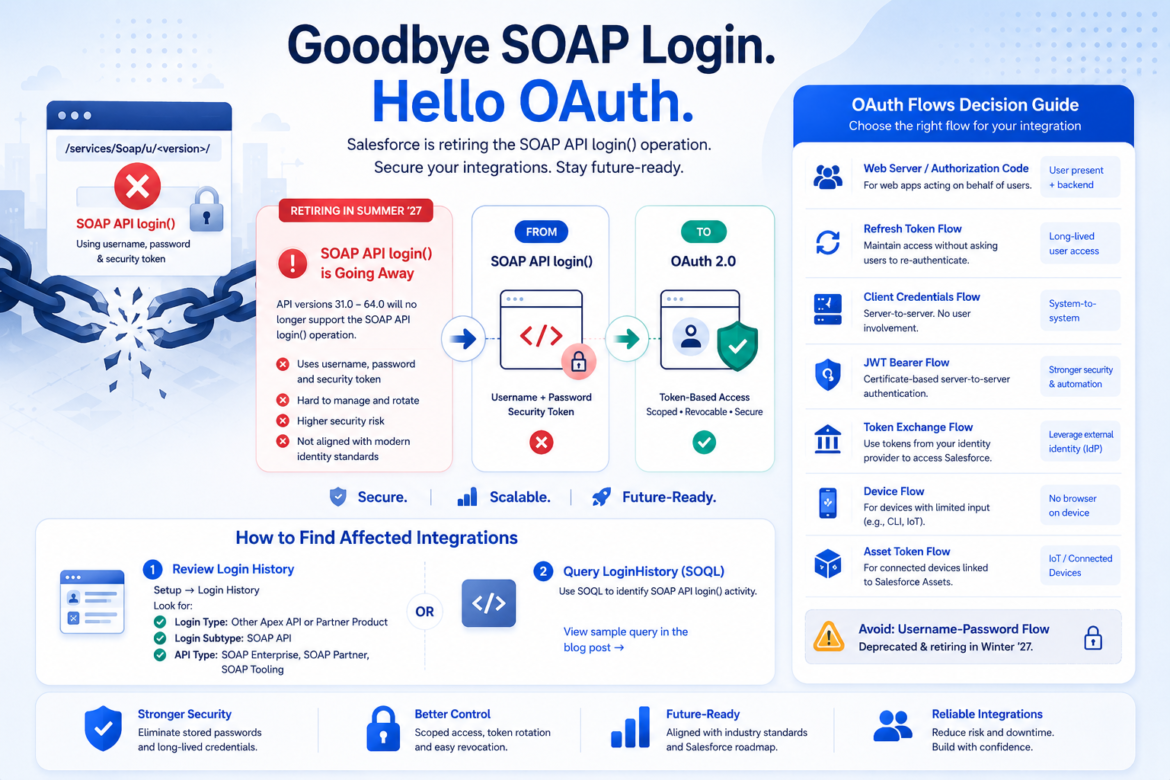
Salesforce is continuing its move toward more secure, standards-based authentication for external applications and integrations.
With the Summer ’27 release, Salesforce will retire the SOAP API login() operation for API versions 31.0 through 64.0. The operation is already unavailable in API version 65.0 and later. Salesforce recommends that affected customers and partners migrate their integrations to External Client Apps and OAuth before the retirement is enforced.
This change may affect:
- Custom integrations
- Middleware and ETL platforms
- Scheduled jobs
- Data migration tools
- Backup and reporting applications
- Partner and ISV products
- Scripts that store a Salesforce username, password and security token
However, this announcement does not mean that the Salesforce SOAP API itself is being retired.
The retirement specifically affects the SOAP API login() operation used to authenticate and obtain a Salesforce session. An integration can continue using supported SOAP API operations after obtaining an access token through OAuth.
For Salesforce customers and partners, the required work consists of three main steps:
- Identify applications that still use SOAP API
login(). - Determine who owns and supports each affected integration.
- Replace the authentication mechanism with an appropriate OAuth flow.
What Is Being Retired?
Historically, an external application could authenticate by submitting a Salesforce username and password to an Enterprise or Partner SOAP endpoint.
Common SOAP login endpoints include:
/services/Soap/c/<version>/
/services/Soap/u/<version>/
Salesforce would return a session ID and server URL. The application would then use that session ID to make subsequent API requests.
With the Summer ’27 release, Salesforce will no longer support this login() operation for SOAP API versions 31.0 through 64.0. Moving the same operation to API version 65.0 or later will not resolve the issue because SOAP API login() is not available in those versions.
What is not being retired?
It is important to distinguish between authentication and API functionality:
- Being retired: SOAP API
login()as an authentication mechanism - Not being retired: Supported Salesforce SOAP API business operations
- Replacement: Obtain an OAuth access token and use it for subsequent API calls
An organization does not necessarily need to rebuild an entire SOAP integration using REST.
In many cases, the existing SOAP operations can remain in place while only the authentication component is changed from SOAP login() to OAuth.
Why Is Salesforce Making This Change?
SOAP API login() typically requires an external system to store and manage long-lived Salesforce user credentials.
These credentials may be stored in:
- Middleware connection configurations
- Application property files
- Environment variables
- Scripts
- CI/CD pipelines
- Secrets-management platforms
- Vendor-managed systems
Even when credentials are encrypted, the external application still depends directly on the Salesforce user’s password. Password expiration, reset policies, security-token changes and compromised credentials can all interrupt or expose the integration.
OAuth introduces a token-based model that separates application access from the user’s Salesforce password.
Depending on the selected flow, an application can authenticate using:
- An interactive user authorization
- A client ID and client secret
- A signed certificate
- A trusted identity-provider assertion
- A token issued by another identity platform
OAuth also supports scoped, revocable and independently manageable access.
OAuth 2.0 is an open authorization framework defined by the Internet Engineering Task Force. It allows applications to obtain limited access to protected services without requiring the resource owner’s password to be shared with the application.
How Salesforce Customers Can Find Affected Integration Users
Salesforce customers can identify SOAP API login() activity using two primary options.
Option 1: Review Login History in Salesforce Setup
Navigate to:
Setup → Login HistoryReview the login records online or download the Login History CSV file.
Look for entries where:
| Login History field | Relevant value |
|---|---|
| Login Type | Other Apex API or Partner Product |
| Login Subtype | SOAP API |
| API Type | SOAP Enterprise, SOAP Partner or SOAP Tooling |
The username identifies the Salesforce user that the external application used to authenticate.
This option is useful for Salesforce administrators who want to review the activity directly through Setup without running a query.
Option 2: Query LoginHistory Using SOQL
Administrators, developers and architects can query the LoginHistory object to identify SOAP API login activity and export the results for further analysis.
SELECT Id,
       UserId,
       User.Name,
       User.Username,
       LoginTime,
       LoginType,
       LoginSubType,
       ApiType,
       ApiVersion,
       Status,
       SourceIp,
       LoginUrl,
       Application
FROM LoginHistory
WHERE LoginTime = LAST_N_DAYS:180
  AND LoginType IN ('Other Apex API', 'Partner Product')
  AND LoginSubType = 'SoapApiLogin'
  AND ApiType IN ('SOAP Enterprise', 'SOAP Partner', 'SOAP Tooling')
ORDER BY LoginTime DESC
In Salesforce Setup, the Login Subtype is displayed as SOAP API. In SOQL, its underlying value is SoapApiLogin.
The query should initially include both successful and failed logins. Failed requests can reveal old applications, scripts or middleware jobs that are still attempting to use SOAP API login().
After identifying an affected user, use the username, source IP, application, API version and login timing to determine which internal system, middleware platform or partner product owns the login.
What Salesforce Partners and Customers Should Do
Salesforce consulting partners, integration partners, ISVs and customers should review both their products and their customer implementations.
A partner application may use the same authentication design across multiple Salesforce environments. Updating one customer’s integration user without correcting the underlying product or connector will not resolve the broader dependency.
Partners should:
- Review every supported product and connector version.
- Identify code that calls the SOAP API
login()operation. - Determine whether credentials are managed by the partner or customer.
- Document which customer environments are affected.
- Select a supported OAuth flow.
- Update deployment and configuration instructions.
- Document the required OAuth scopes and permissions.
- Test the updated authentication in sandboxes.
- Provide customers with a migration and credential-removal plan.
Partners should also avoid replacing the SOAP API login() with the OAuth username-password flow.
Although the username-password flow uses an OAuth endpoint, it still requires the application to store the user’s Salesforce credentials. Salesforce considers the username-password and user-agent flows insecure and does not recommend them. Salesforce has also announced that the OAuth username-password flow for Connected Apps will stop being supported in Winter ’27.
External Client Apps and Connected Apps
Salesforce OAuth integrations have traditionally been configured through Connected Apps.
Salesforce now recommends External Client Apps, which are the next generation of Connected Apps and provide improved security and packaging capabilities.
As of Spring ’26, the creation of new Connected Apps is restricted. Existing Connected Apps can continue to operate, but Salesforce recommends using External Client Apps for new implementations.
An External Client App defines how the external application can connect to Salesforce, including:
- The permitted OAuth flows
- OAuth scopes
- Callback URLs
- Certificates or client credentials
- User-access policies
- Token and session policies
- The integration user, where applicable
Selecting the correct OAuth flow is therefore an architectural decision, not simply a configuration checkbox.
Understanding Salesforce OAuth Authorization Flows
There is no single OAuth flow that is suitable for every application.
The correct flow depends on questions such as:
- Is a human user present?
- Is the application acting on behalf of a user?
- Is it a backend system-to-system integration?
- Can the application securely protect a client secret?
- Can the application protect a private certificate key?
- Does it require continued access after the user leaves?
- Is there an existing enterprise identity provider?
- Is the client a web application, mobile app, command-line tool or connected device?
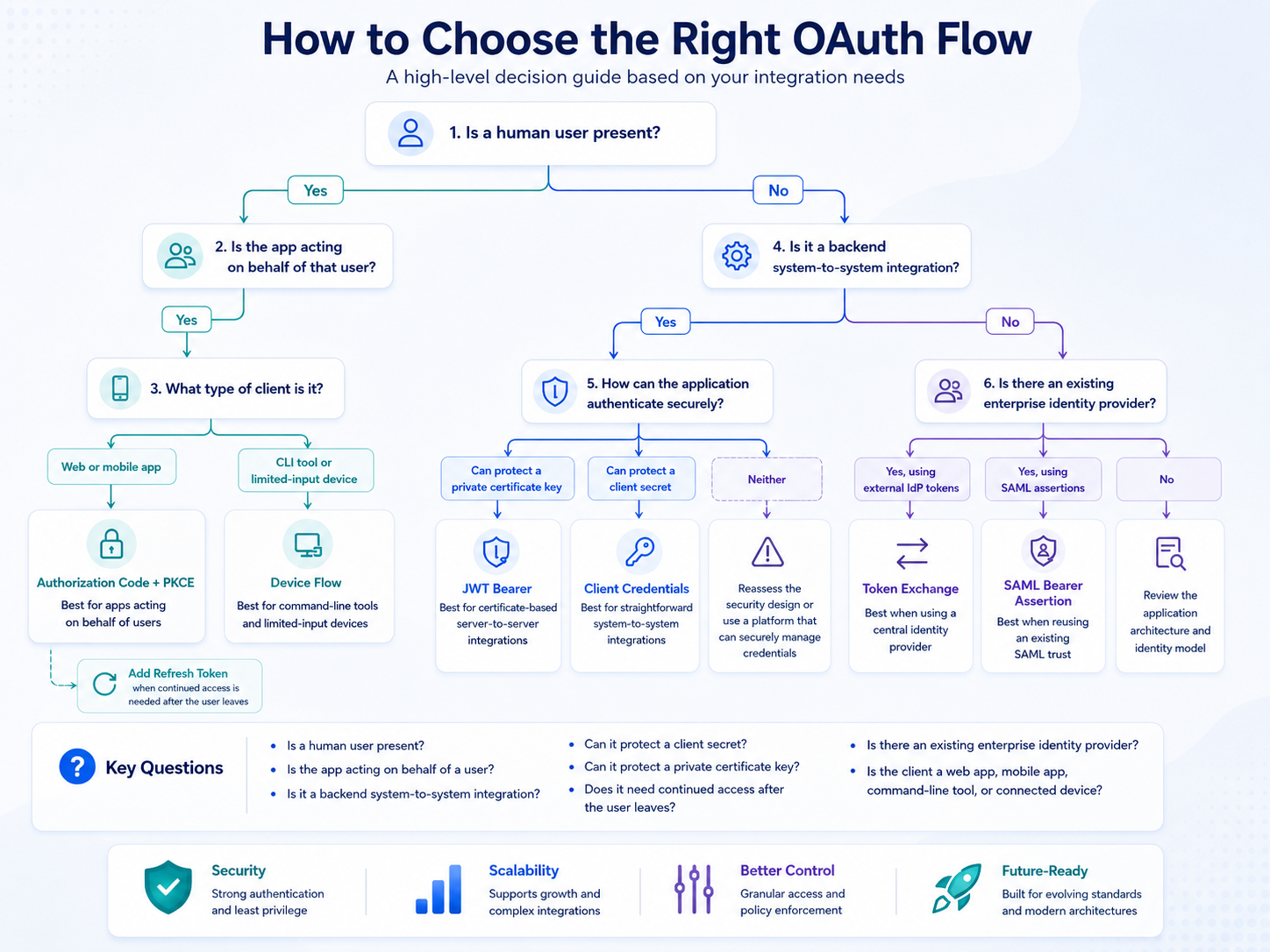
Salesforce supports multiple OAuth flows because each integration architecture has different security and operational requirements.
1. OAuth 2.0 Web Server Flow
The Web Server Flow implements the OAuth 2.0 Authorization Code grant.
The application redirects the user to Salesforce, where the user authenticates and authorizes the application. Salesforce returns a short-lived authorization code to the application’s callback URL. The application’s backend exchanges that code for an access token and, when requested and permitted, a refresh token.
Use it when
- A web application accesses Salesforce on behalf of individual users.
- A partner SaaS application connects to multiple customer orgs.
- Each user or customer must authorize the application.
- The application has a secure backend.
- The application requires continued access through a refresh token.
Typical examples
- A third-party SaaS application with a “Connect to Salesforce” button
- A customer portal that accesses Salesforce for the signed-in user
- A partner application installed by multiple Salesforce customers
For modern public clients, Authorization Code with Proof Key for Code Exchange, or PKCE, should be preferred over returning tokens directly through the browser.
2. OAuth 2.0 User-Agent Flow
The User-Agent Flow implements the OAuth 2.0 Implicit grant.
The user authenticates through a browser, and Salesforce returns the access token directly through the browser redirect rather than returning an authorization code for a secure server-side exchange.
Use it when
For new implementations, this flow should generally not be used.
Salesforce considers the User-Agent Flow insecure and recommends blocking it where it is not required. Modern browser, desktop and mobile applications should generally use an authorization-code-based flow with PKCE.
Preferred alternative
Use the Web Server or Authorization Code Flow with PKCE.
3. OAuth 2.0 Refresh Token Flow
Access tokens are normally temporary.
The Refresh Token Flow allows an application to exchange a previously issued refresh token for a new access token without requiring the user to authenticate and authorize the application again.
The refresh token is generally obtained through another flow, such as the Web Server Flow.
Use it when
- An application needs continued or offline access.
- A user has already completed an interactive authorization.
- Requiring the user to log in for every session is not practical.
- The application can protect the refresh token securely.
Important consideration
A refresh token is a long-lived credential. It should be encrypted, access-controlled and stored in a secure secrets-management platform.
The application must also handle cases where the token is expired, revoked or invalidated.
4. OAuth 2.0 Client Credentials Flow
The Client Credentials Flow is designed for direct system-to-system communication without interactive user involvement.
The external application exchanges its client ID and client secret for a Salesforce access token. Salesforce executes the integration under the run-as user configured for the External Client App or Connected App.
The flow does not normally issue a refresh token. The application requests a new access token when needed.
Use it when
- One backend system communicates directly with Salesforce.
- The integration always runs as the same dedicated integration user.
- No human authorization is required.
- The application can securely store and rotate a client secret.
- A straightforward machine-to-machine design is needed.
Typical examples
- ETL and middleware integrations
- Scheduled data synchronization
- ERP or financial-system integrations
- Backend services that publish data to Salesforce
- Automated jobs running under one integration identity
For many integrations currently using SOAP API login(), Client Credentials may be the most direct replacement.
Key controls
- Use a dedicated integration user.
- Apply least-privilege permissions.
- Restrict OAuth scopes.
- Store the client secret in a secure Secrets Manager.
- Define a secret-rotation process.
- Monitor token requests and integration activity.
5. OAuth 2.0 JWT Bearer Flow
The JWT Bearer Flow is another non-interactive server-to-server authentication option.
The external application creates a JSON Web Token, signs it using a private key and submits the signed token to Salesforce. Salesforce validates the signature using the public certificate configured for the application and then issues an access token.
Use it when
- A backend integration can securely protect a private key.
- Certificate-based authentication is preferred over a shared secret.
- Automated authentication is required without an interactive user.
- The integration must execute as a specific authorized Salesforce user.
- The organization already has certificate and key-management capabilities.
Typical examples
- Enterprise middleware
- CI/CD pipelines
- Scheduled batch processing
- Partner-managed backend services
- Applications using public-key infrastructure
The JWT Bearer Flow normally does not require a refresh token. The application signs a new JWT and requests another access token when needed.
Client Credentials or JWT Bearer?
Both flows support non-interactive server-to-server authentication.
Choose Client Credentials when:
- One application runs as one configured integration user.
- A client ID and secret can be securely managed.
- Simplicity is the main objective.
Choose JWT Bearer when:
- Certificate-based authentication is preferred.
- The organization has mature key-management capabilities.
- Avoiding shared client secrets is a security requirement.
- The application needs a signed assertion representing an authorized user.
Client Credentials may be simpler to implement, while JWT Bearer can provide stronger assurance when the private key is protected appropriately.
Neither option removes the need for least-privilege permissions, credential rotation, monitoring and a dedicated integration identity.
6. OAuth 2.0 SAML Bearer Assertion Flow
The SAML Bearer Assertion Flow allows an application to exchange a signed SAML 2.0 assertion for a Salesforce OAuth access token.
Salesforce validates the signed assertion and uses it to identify the user and authorization context.
Use it when
- The organization already has an established SAML identity architecture.
- An identity provider can issue the required signed SAML assertions.
- The integration should reuse an existing SAML trust relationship.
- Introducing a separate JWT or client-secret model would create unnecessary complexity.
Typical examples
- Enterprise applications using an existing SAML identity provider
- Integrations that must operate within an established federation model
- Environments where SAML assertions are already issued for trusted applications
For a new, straightforward machine-to-machine integration, Client Credentials or JWT Bearer is generally easier to implement and operate.
7. SAML Assertion Flow
The SAML Assertion Flow allows organizations already using SAML-based Salesforce single sign-on to extend that federation model to API access.
An application submits a SAML assertion to the Salesforce OAuth endpoint and receives an access token after Salesforce validates the assertion. Unlike the SAML Bearer Assertion Flow, this pattern can use the existing Salesforce SAML configuration without requiring a separate client application for the same purpose.
Use it when
- Salesforce SAML single sign-on is already configured.
- The integration should reuse the existing SAML federation.
- The identity provider is responsible for issuing the assertion.
- The organization wants web and API access to follow the same trust model.
This is a specialized enterprise identity pattern and is not the usual replacement for a basic SOAP username-and-password integration.
8. OAuth 2.0 Token Exchange Flow
The Token Exchange Flow allows an application to present a token issued by another trusted identity provider and exchange it for a Salesforce access token.
Salesforce validates the external token, maps the external identity to a Salesforce user and issues a Salesforce token based on the configured token-exchange policy.
OAuth token exchange is also defined as an industry-standard protocol through RFC 8693. It is designed to support token exchange, delegation and impersonation across systems and security domains.
Use it when
- A central identity provider serves multiple applications.
- Users are already authenticated outside Salesforce.
- An existing external token must be converted into Salesforce API access.
- The architecture should avoid asking the user to log in to Salesforce again.
- Identity must be carried across applications or microservices.
Typical examples
- Microsoft Entra ID or Okta is the central identity authority.
- An enterprise portal already has an authenticated user session.
- Microservices carry tokens issued by a shared identity provider.
- A multi-platform architecture requires delegated access to Salesforce.
Token Exchange can simplify complex enterprise identity architectures, but it requires careful token validation, trust configuration and user mapping.
9. OAuth 2.0 Device Flow
The Device Flow is designed for applications running on devices that have limited input or browser capabilities.
The device displays a verification code and directs the user to complete authorization from another browser-enabled device. After the user approves the request, the original device receives an access token.
Use it when
- The user is present but cannot conveniently sign in on the original device.
- The application runs on a device with limited input or display capabilities.
- A command-line application needs interactive authorization.
Typical examples
- Smart TVs
- Connected appliances
- Command-line utilities
- Limited-input devices
This flow is not normally appropriate for unattended scheduled integrations. Those integrations should generally use Client Credentials, JWT Bearer or another server-to-server flow.
10. OAuth 2.0 Asset Token Flow
The Asset Token Flow is designed for connected devices that must be securely associated with Salesforce CRM data.
The application first obtains an OAuth access token and then exchanges identity and device information for an asset token. The asset token represents the connected device and can link it to Salesforce records such as Assets, Accounts or Contacts.
Use it when
- Physical devices must have individual identities.
- Devices must be associated with Salesforce Asset records.
- Requests must be linked to customers, accounts or installed products.
- Device access must be separated from the broader application identity.
Typical examples
- Connected appliances
- Industrial equipment
- Telematics devices
- Customer-installed hardware
- Internet of Things solutions
This flow is specialized and is not usually relevant to traditional middleware or ETL integrations.
11. OAuth 2.0 Hybrid App Flows
Hybrid applications may require both Salesforce API access and Salesforce web sessions.
Salesforce provides specialized hybrid flows that connect OAuth access and refresh tokens with Salesforce browser sessions:
- Hybrid User-Agent Token Flow
- Hybrid Web Server Flow
- Hybrid App Refresh Token Flow
These flows help applications manage session IDs and cookies for Salesforce domains, including embedded Lightning or Visualforce experiences.
Use them when
- A mobile or desktop application embeds Salesforce web experiences.
- The application needs both API access and browser-session management.
- Lightning or Visualforce content is displayed inside a hybrid application.
- The application must directly manage Salesforce web-session cookies.
These are specialized flows and should not be selected as a SOAP API login() replacement unless the application genuinely requires embedded Salesforce web sessions.
12. OAuth 2.0 Username-Password Flow
The Username-Password Flow allows an application to submit a Salesforce username and password directly to the OAuth token endpoint.
Although the request uses OAuth, the application must still store and manage the user’s Salesforce credentials. It therefore retains many of the same security and operational risks as SOAP API login().
Use it when
Do not select this flow for a new implementation or as the target replacement for SOAP API login().
Salesforce considers the flow insecure, blocks it by default in newer environments and recommends alternatives such as Client Credentials. Salesforce has announced that the flow will stop being supported for Connected Apps in Winter ’27, and is disabled by default and must be explicitly enabled before it can be used.
Moving from SOAP username-and-password authentication to OAuth username-and-password authentication would only move the same credential dependency to a different endpoint.
Preferred alternatives
- Client Credentials for straightforward system-to-system integrations
- JWT Bearer for certificate-based integrations
- Web Server or Authorization Code with PKCE for user-authorized applications
- Token Exchange for architectures using a central identity provider
OAuth Is Bigger Than Salesforce
OAuth may appear to be a Salesforce login feature, but it is a technology standard used across the wider industry.
The same concepts are used by:
- Microsoft
- Cloud platforms
- Identity providers
- Banking APIs
- SaaS applications
- Mobile applications
- Enterprise APIs
- Microservices
OAuth 2.0 defines several common roles:
| OAuth role | Salesforce example |
|---|---|
| Resource owner | The user or organization authorizing access |
| Client | The external application or integration |
| Authorization server | Salesforce identity and OAuth endpoints |
| Resource server | Salesforce APIs and protected data |
| Access token | The credential presented with API requests |
| Scope | The access boundaries granted to the application |
OAuth separates:
- The identity of the application
- The identity of the user or service
- The permissions being granted
- The credential used for API access
- The lifecycle and revocation of that access
This separation is the key architectural improvement over embedding a Salesforce username and password inside an integration.
OAuth itself is primarily an authorization framework. OpenID Connect builds an identity layer on top of OAuth for authentication and federated login.
Salesforce implements these industry-standard patterns within its own identity platform, but the architectural principles are transferable to other technologies and platforms. A team that understands Client Credentials, Authorization Code, JWT assertions, refresh tokens, and token exchange can apply the same concepts when integrating with many other modern APIs.
OAuth Flow Decision Guide
| Integration scenario | Recommended flow |
|---|---|
| Scheduled system-to-system integration using one integration user | Client Credentials |
| Server-to-server integration using certificates | JWT Bearer |
| Partner SaaS application connecting to multiple customer orgs | Web Server or Authorization Code with PKCE |
| Application acting on behalf of an interactive user | Web Server or Authorization Code |
| Existing central identity provider and trusted external tokens | Token Exchange |
| Existing SAML federation | SAML Bearer Assertion or SAML Assertion |
| Command-line or limited-input device | Device Flow |
| Connected device linked to a Salesforce Asset | Asset Token |
| Hybrid application embedding Salesforce web sessions | Salesforce Hybrid OAuth flows |
| Existing Username-Password Flow | Migrate to a supported alternative |
| Existing User-Agent or Implicit Flow | Migrate to Authorization Code with PKCE |
A Practical Migration Approach
1. Identify affected logins
Review Salesforce Login History or query LoginHistory to find users authenticating through SOAP API login().
2. Identify the owning application
Map each affected integration user to:
- The application or middleware platform
- Business owner
- Technical owner
- Vendor or partner
- Environment
- Schedule
- Data accessed
- Business criticality
3. Confirm the authentication mechanism
Review the integration configuration or source code.
Look for:
- Calls to the SOAP
login()operation - Enterprise or Partner WSDL login bindings
/services/Soap/c/or/services/Soap/u/login endpoints- Stored Salesforce usernames and passwords
- Stored Salesforce security tokens
4. Select the target OAuth flow
Base the decision on whether the application is:
- Interactive or unattended
- User-based or system-based
- Able to protect a secret
- Able to protect a private key
- Connected to an existing identity provider
- Single-org or multi-customer
5. Configure an External Client App
Define:
- The permitted OAuth flow
- OAuth scopes
- Callback URLs, where applicable
- User-access policies
- Permission sets
- The run-as integration user
- Certificate or client credentials
- Token and session policies
6. Apply least privilege
Do not automatically assign an administrator as the integration user.
Use a dedicated integration identity and grant only the object, field, Apex and API permissions required by the integration.
7. Update the authentication component
Replace SOAP API login() with the selected OAuth token request.
Where appropriate, the application can continue using the resulting access token with its existing SOAP operations.
8. Test operational scenarios
Test:
- Token expiration
- Client-secret rotation
- Certificate rotation
- Permission removal
- Integration-user deactivation
- OAuth application revocation
- Sandbox refreshes
- Invalid OAuth scopes
- Identity-provider failures
- Network interruptions
9. Monitor after deployment
Confirm that:
- The new OAuth login appears in Login History.
- SOAP API
login()activity has stopped. - No fallback to stored Salesforce credentials remains.
- Old usernames, passwords and security tokens are removed.
- Token failures and integration errors are monitored.
- Application ownership and credential-rotation procedures are documented.
Final Takeaway
The retirement of Salesforce SOAP API login() is not simply an API-version upgrade.
It is an authentication architecture change.
Salesforce customers must identify which integration users and applications still rely on SOAP-based authentication. Partners must review their products, connectors and customer deployments to ensure that the underlying authentication mechanism is updated.
For most affected integrations, the target will likely be one of three flows:
- Client Credentials for straightforward system-to-system integrations
- JWT Bearer for certificate-based, non-interactive integrations
- Authorization Code with PKCE for applications acting on behalf of users
Organizations should avoid replacing one password-based flow with another.
Salesforce’s retirement of SOAP API login() and the OAuth username-password flow demonstrates a clear direction: external applications should use scoped, token-based and independently manageable identities instead of storing Salesforce user passwords.
Starting early provides benefits beyond meeting the retirement deadline. It creates an opportunity to improve:
- Integration ownership
- Credential management
- Least-privilege access
- Monitoring and auditability
- Business continuity
- Alignment with modern identity standards